
Please note that you have be invited before you can use this platform.
Invitation
You will receive an invitation to receive payments through our crypto payments processing platform. Please click the link in the invitation email or go to payouts.rocketfuel.inc and sign up using the same email address you received the invite on.
SignUp
- Use the same email that you received the invite on.
- Enter the email on the sign up page
- You will receive a code on your email
- Enter the code you received via email on the sign up page
That’s it! You are registered on the platform. Please note that you have to complete the verification process before you can transfer any funds.
Login
- Use the same email that you received the invite on.
- Enter the email on the sign up page
- You will receive a code on your email
- Enter the code you received via email on the sign up page
Home Page
This is your home page. You can check your balance and the transaction history here. The transaction history shows you all the payments you have received and the money you have transferred out. You can click on a transaction to see more details.
If you have not completed the verification process, you can start the process by tapping the verification process link on the Home page. Please note that you have to complete the verification process before you can transfer any funds.
Initiating Transfer
- Click on the Transfer button to initiate transfer
- Enter the amount you want to transfer
- You can enter the full amount by pressing the Max button
Choose Payment Method
- Various payment methods are available for transfers and more methods will be added over time
- Choose a payment method
- Crypto
- Non-Crypto - local bank deposits in local currencies
Here is a list of crypto currencies available on the platform:
| Crypto Currency | Text | Network |
| Bitcoin | BTC | Bitcoin |
| Ethereum | ETH | Ethereum |
| Litecoin | LTC | Litecoin |
| Polygon | MATIC | Polygon |
| Solana | SOL | Solana |
| USD Coin | USDC | Ethereum |
| USD Coin | USDC | Ploygon |
| Tether | USDT | Ethereum |
Note: Please ensure to choose the coin and network based on the wallet you have.
Crypto - Provide Wallet & Review Transfer details
-
Enter the wallet address that you want to send funds to. Please ensure that this is a wallet you have access to, and it can receive the chosen crypto currency.
Note: If you don’t have a wallet, click here to learn how to get one. - You can also scan the QR code generated by your wallet application by tapping on the QR code icon.
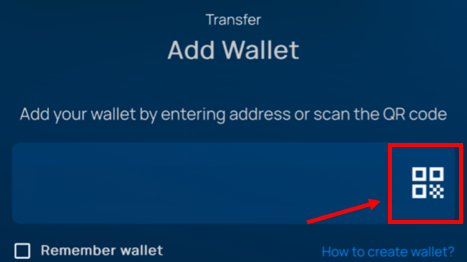
- Review the transfer details
- Press Transfer and confirm the wallet and network one more time.
That’s it! Money is on the way to your wallet!
Note: Some crypto currencies can take a few minutes to a few hours to transfer. You can check the status of the transfer by clicking the transaction on the Home page.
Non-Crypto Payment Method Process
- Select the country or region where your bank is located or where you are currently residing.
- [Optional] Choose a transfer method. If multiple transfer methods are available for your country, please select the one you prefer. If you don't encounter this option, it means that bank transfer is the only available method for your country, and it has been automatically selected.
- [Optional] Choose a currency. If multiple currencies are available for your country, please select the one you prefer. If you don't encounter this option, it means that there is only one currency option for your country, and it has been automatically selected.
- Provide your bank details where you wish to receive the payment. Ensure that you enter the details accurately. The bank account you provide should be active.
- Review your transfer details.
- Once you have carefully reviewed all the details, press "Confirm".
That’s it, your money is on the way to your account!
Comments
3 comments
Sir I have an Account in ONPASSIVE ICO System and I payment for that ID activation through your RoccketFuel 143.79 $ on Dated 03/10/2023 but my said ID not Activated
Now Your I'd activated..
Please comment me
Article is closed for comments.